From tyre shop to car marketplace
Redesigning the landing page of Sgcarmart’s e-Shop so it works as a one-stop marketplace for everything car-related — not just tyres and rims.
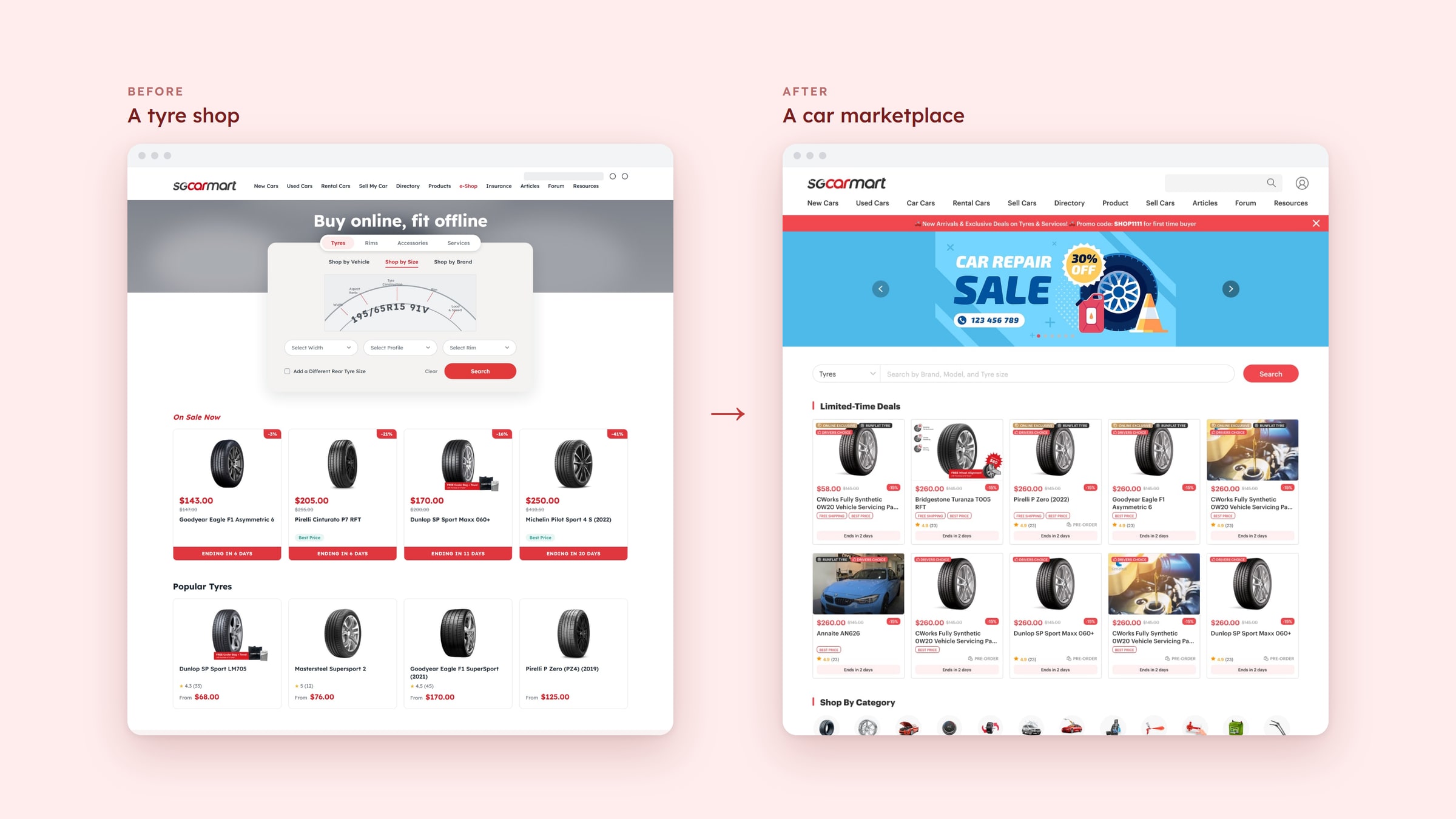
In one line: a tyre-finder page rebuilt as a car marketplace — with general search, limited-time deals, shop by category, online exclusives and brand advertising.
- My role
- UI/UX Designer, with a Senior Designer
- Team
- Senior Designer, me, PM, BA, 2 developers
- Duration
- ~5 months · launched 2025
- Focus
- E-commerce · Marketplace
Overview
Sgcarmart’s e-Shop began as a place to buy tyres and rims. The business now wanted it to be more: a marketplace for anything car-related — accessories, car care, lubricants, parts and services — sold by many sellers, not just one catalogue.
I was the UI/UX designer on the redesign of the e-Shop landing page, working with a senior designer, a project manager, a business analyst and two developers over about five months. It launched in 2025.
Where it started
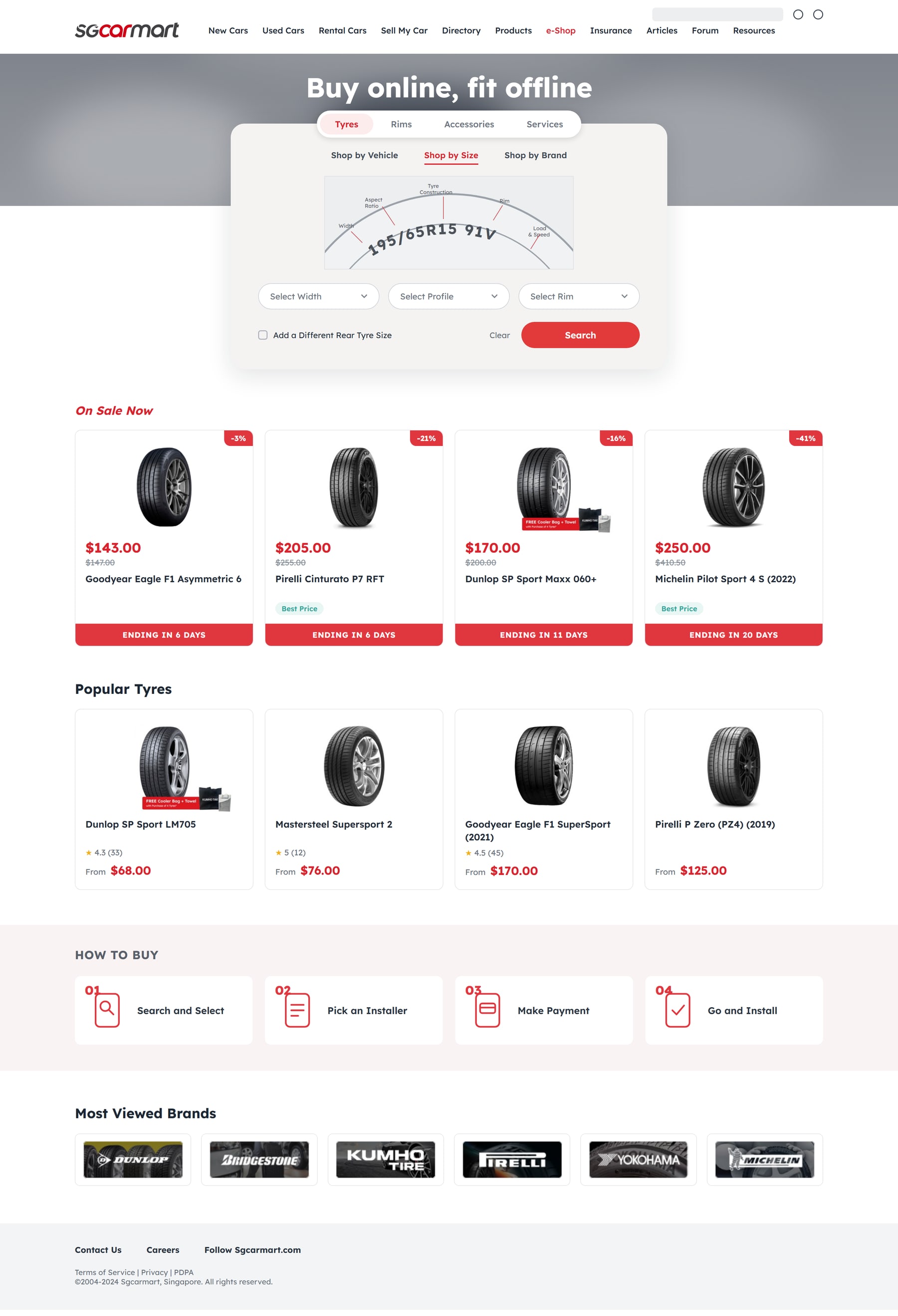
Before the redesign, the page behaved like a tyre store. “Buy online, fit offline” led straight into a tyre-size finder, with a row of tabs above it — Tyres, Rims, Accessories and Services — but the finder, the deals and the popular items were all about tyres. Anything else — a dash cam, engine oil, suspension — had to be found far down the page, if at all.
That was fine for a tyre shop. It was the wrong front door for a marketplace.
What the heatmaps showed
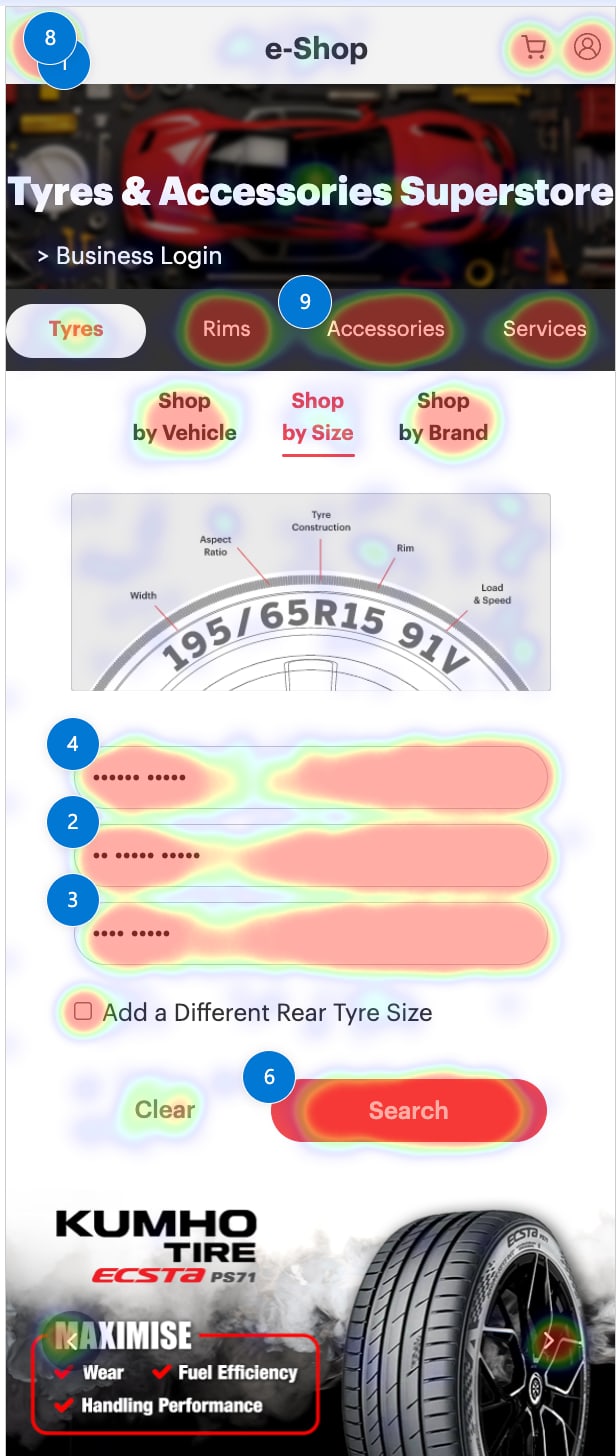
To see how people really used the page, we looked at click heatmaps of the old mobile page. The pattern was clear — and it explained the problem better than any opinion could.
Nearly all the heat sat in the first screen: the category tabs, Shop by Vehicle / Size / Brand, the three size dropdowns and the Search button. The page was being used as a tyre finder.
On Sale cards, Popular Items, What’s New, How to Buy and the brands row barely registered. In the heatmap tooltip, one On Sale card shows 10 clicks — 0.03%.
Cameras, oils and suspension sat under Popular Items and What’s New, in the part of the page nobody reached. A bigger catalogue would have stayed invisible.
If you didn’t know your tyre size, there was no obvious next step. A marketplace needs several ways to start: search, categories, deals and brands.

What the business needed
Representatives from different departments each brought their own requirements. Four themes came through — and together they described a marketplace, not a tyre shop.
Products you can only buy online, at the online price, needed to be easy to spot — a reason to shop the e-Shop rather than anywhere else.
One search that works across the whole shop — by brand, model or tyre size — instead of a finder that only understood tyres.
Deals that run for a set period, with the time left visible on each product, to create reasons to come back and buy now.
Space for brands to advertise and be featured, so the page could earn as well as sell.
Process
Turning needs into page structure
I started by translating the four business needs and the heatmap findings into a simple question: what should a first-time visitor see, in what order, on a page that sells everything? The answer was a front door with a general search, live deals, browsable categories, and room for brands.
Wireframes for desktop and mobile
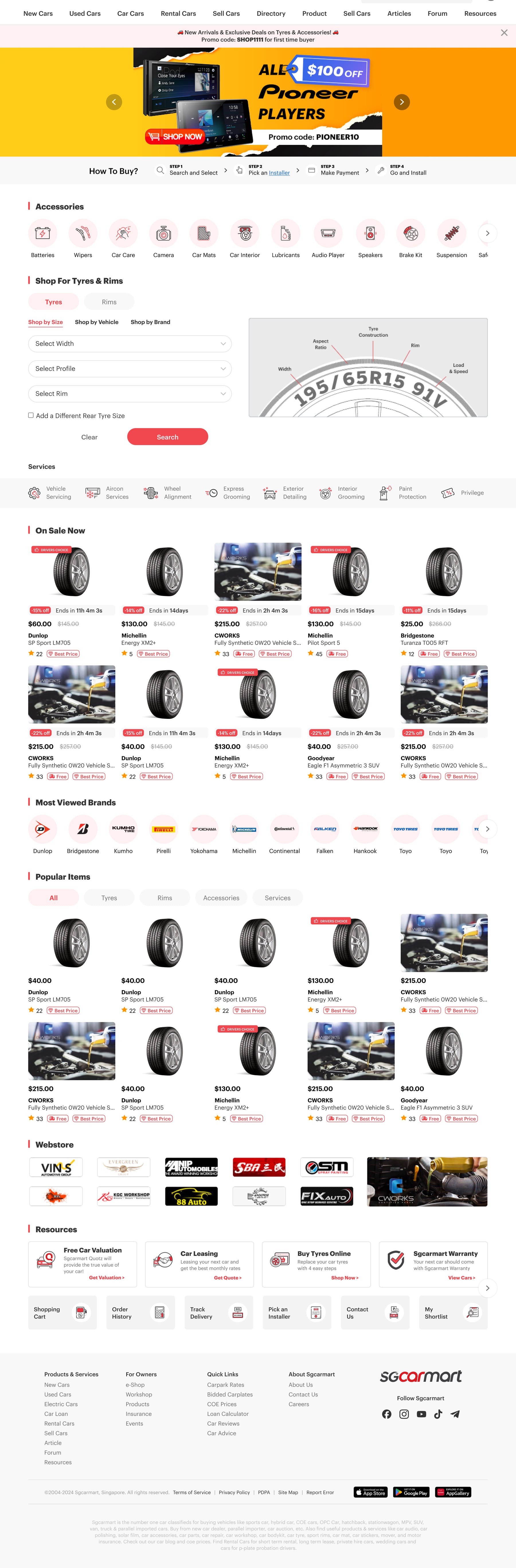
I wireframed desktop and mobile together to settle structure before visual design. Early versions still led with the tyre-size finder and an accessories row. Over the iterations the structure shifted: the tyre finder moved into a pop-up opened from the Tyres and Rims categories, a general search took its place at the top, and deals moved up to the first thing below it.
Reading the friction, then iterating
Heatmaps showed us where people stopped paying attention. Each pass of the wireframes was checked against them: could someone reach a non-tyre product without scrolling past a wall of tyres? Did every section have a reason to exist in that position?
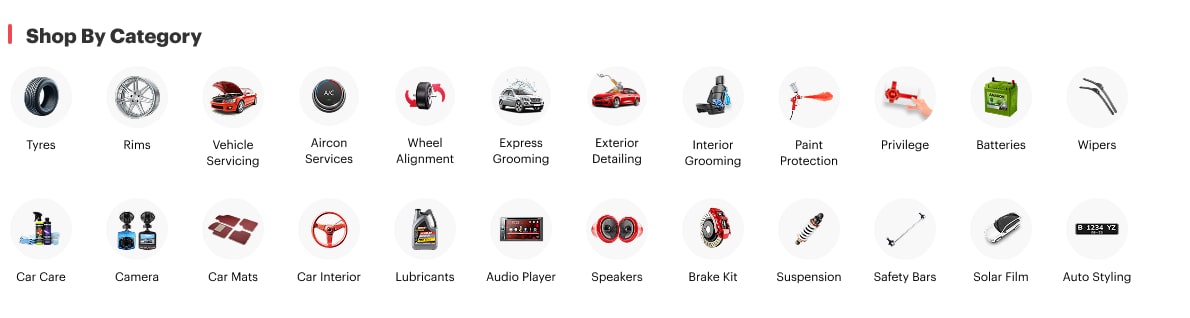
Testing what to show in “Shop by category”
Categories were the new way into the shop, so we tested how to present them: illustrated icons or real product images. We ran an A/B test for one week. The real images received more clicks, so that’s what we went with.
Design details for the team
I annotated the designs for the developers — for example, product carousels on desktop but a simpler layout on mobile with no “Load more”, a brand strip that shows every logo on desktop and two rows on mobile, and tabs on Customer Favorites to bring out different products.

The A/B test: illustrations or real images?
The same set of categories, two treatments. Illustrated icons look tidy, but real product images show people exactly what they’d be buying. After one week, real images got more clicks and became the final design.

What changed
The same four business needs, answered before and after. The old page is on the left, the redesign on the right.
General search
One way in for the whole shop, instead of a finder that only understood tyres.
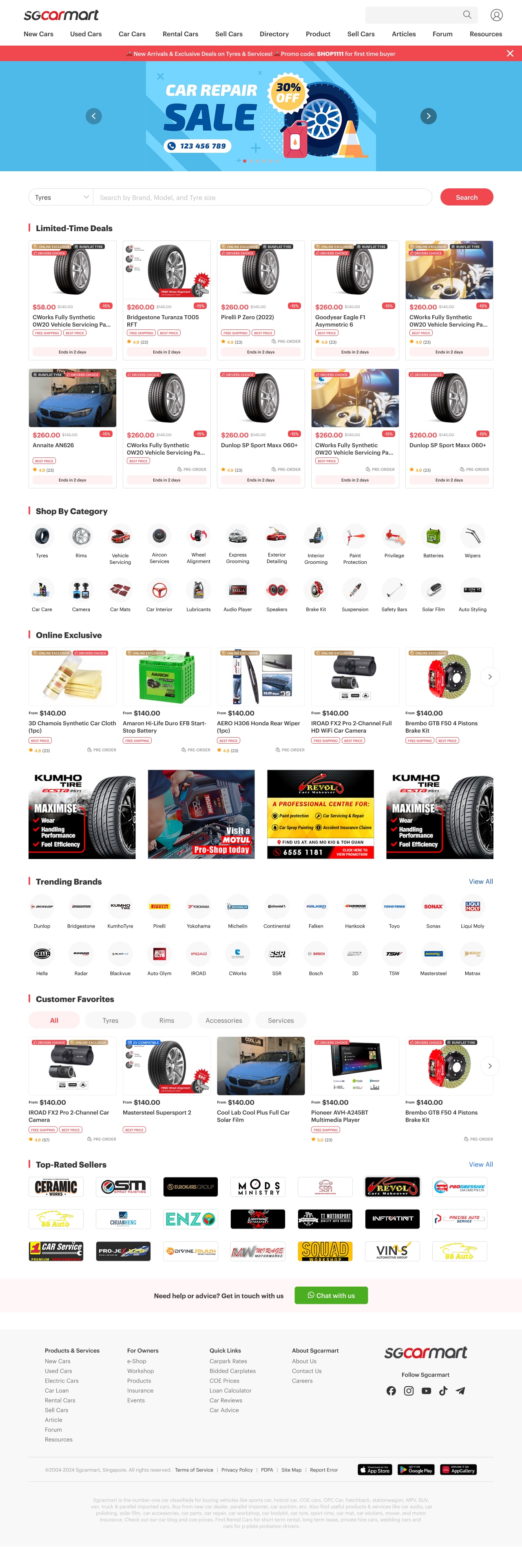
Limited-time deals
Deals lead the page, across tyres, car care and more.
Shop by category
A way to browse beyond tyres.
Online exclusivity
Products you can only buy online, easy to spot.
Brand advertising
Visible space for brands to advertise.

Outcome
The redesigned landing page launched in 2025, turning the e-Shop’s front door from a tyre finder into a marketplace homepage built around search, deals, categories and brands — ready for products well beyond tyres.
I moved on shortly after launch, so I don’t have post-launch metrics to share. The live page has since evolved, but it still carries parts of this design — you can see it at sgcarmart.com/shop ↗.
What I took away
A storefront is a promise about what you sell. The old page told every visitor “tyres”, so nothing else ever got a chance. The fix was less about visuals than about giving the shop a structure that can keep growing.
And heatmaps told us where people looked while the A/B test told us what they preferred. Using both kept the design conversation about evidence rather than taste.